The Circuitry
THE CIRCUITRYYour one-stop source for all tech news
HOMETODAYNEWSFEEDEVENTS
BOOKMARKS
RSS
© 2026 The Circuitry
About UsSourcesContactCorrectionsPrivacy
  • Today
  • Feed
  • Events
  • Saved
Scroll for more
Verification
VERIFIEDConfidence: HIGH
Source identified
Claims cross-referenced
No discrepancies found
Sourcing
1source

via 9to5Mac

9to5Mac · track record
68Stories
100%Verified
530d
All sources →
Markets
AAPL···

Live quote · not investment advice

Home/Tech/Apple Frames 4 shortcut cuts steps from 800 to 300, adds CLI
VERIFIEDBy Xavier Rivera· ·1 min read

Apple Frames 4 shortcut cuts steps from 800 to 300, adds CLI

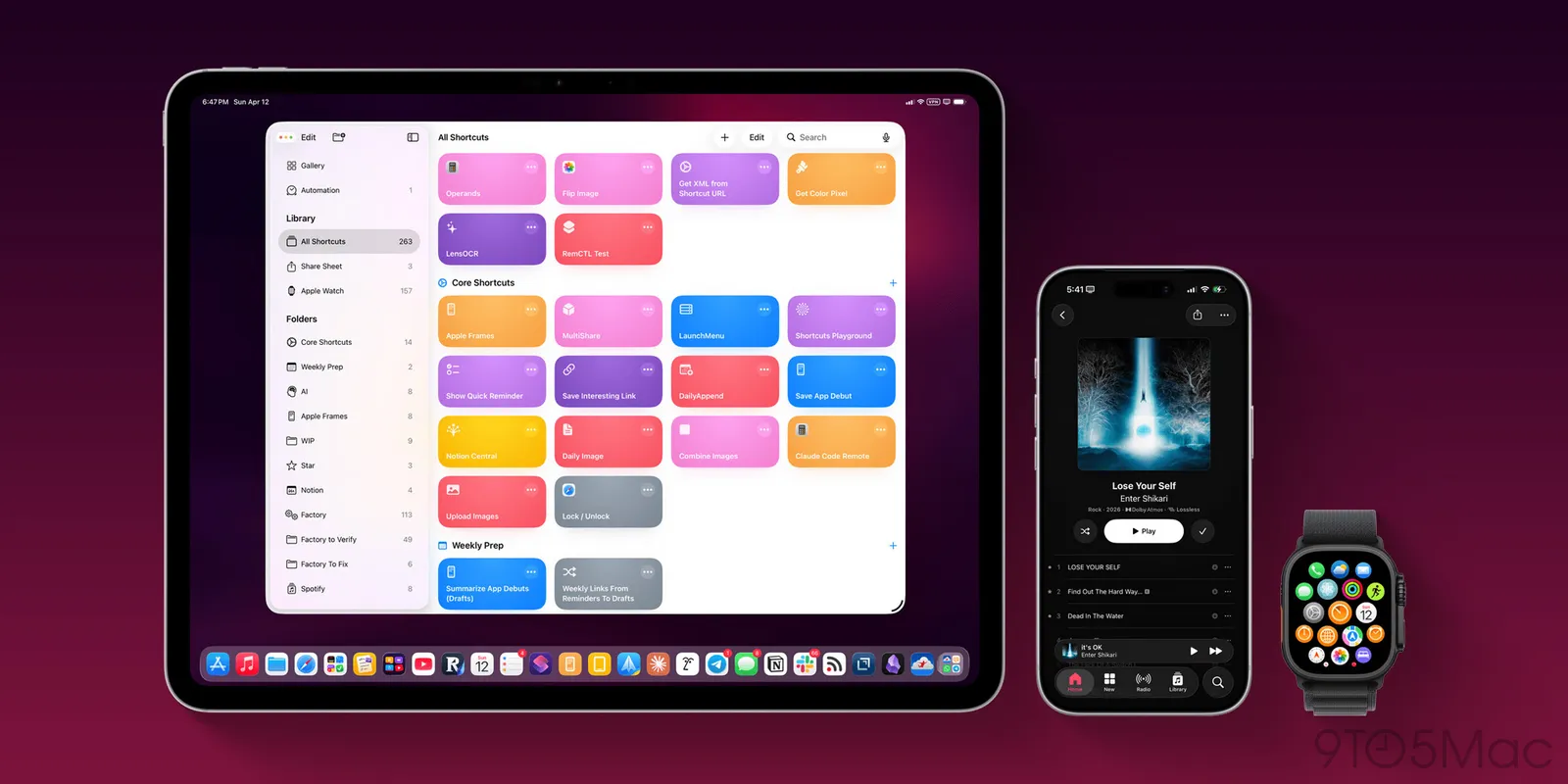
Federico Viticci updated his Apple Frames shortcut to version 4, slashing steps from over 800 to 300 while adding frame colors, device variants, proportional scaling, and a new Mac Terminal CLI. The overhaul boosts speed, reliability, and utility for developers handling screenshots in workflows including AI agents.
Source:9to5Mac
Post
Apple Frames 4 shortcut cuts steps from 800 to 300, adds CLI
TL;DRAI · 60 sec read

Federico Viticci releases Apple Frames 4, cutting his screenshot-framing shortcut from over 800 to 300 steps with support for latest Apple devices, colored bezels, variants like iPhone 16 Pro or 17 Pro, proportional scaling, and a new Mac Terminal CLI. This boosts speed, reliability, and workflows for developers and marketers.

Federico Viticci at MacStories released Apple Frames 4, a major update to his shortcut that frames screenshots with official Apple product bezels.

Viticci describes the update as a complete rethinking that makes the shortcut noticeably faster, with support for all the latest Apple devices and more personalization options. He trimmed the complex shortcut from over 800 steps to around 300, improving speed and reliability through intelligent logic that adapts to Apple's growing ecosystem of screen sizes and resolutions.
From The CircuitryThe Feed — live briefs across tech, all day.See what’s happening →
New features include support for all colored bezels officially offered by Apple, customizable per device and orientation. The update adds device variants, such as choosing between iPhone 16 Pro or iPhone 17 Pro frames, and proportional scaling for merging screenshots from different devices like iPhone 17 Pro Max and iPad Pro, respecting physical proportions.

Viticci also built a command-line interface for Terminal on Mac to frame screenshots, aimed at developers and marketers. The CLI adopts an agent-first mindset and includes a skill for agentic app development workflows using tools like Claude or Codex.
The new shortcut and CLI details are available on the MacStories website. Apple Frames serves as a key workflow tool for 9to5Mac and developers.
Why this mattersAI · ~100 words

Tap a lens to see what this story means for you.

Reader-supported
DonateBuy me a coffee →Follow@thecircuitry_ →Follow@thecircuitry.to →

Reader-supported · The Brief

Liked this? The Brief brings you the whole day in tech, verified, every morning. Two minutes, free forever.

HELP US IMPROVE
From The Circuitry

See what’s happening right now

The Feed runs all day — short, verified briefs the moment they break.

Open the Feed →
From The Circuitry

Follow @thecircuitry_

Every story we publish, as it happens. No noise between.

Follow on X ↗On Bluesky ↗

Reader-supported

The Circuitry is a passion project I've always wanted to build, and I love the work behind it.

Running it costs real money. APIs, hosting, time. To keep improving the site and growing this into something useful for everyone, those costs have to be covered.

Any contribution is appreciated. If not, no pressure. Thanks for reading.

Buy me a coffee
AppleShortcutsDevelopers
More from9to5Mac
  • Tim Cook Marks End of His Tenure Leading Apple Earnings Calls

    Tech · 8d
  • Apple tests AI for Genius Bar, sends letters to ex-staff at OpenAI

    Tech · 17d
  • Apple to launch Upgrade leasing program on July 28

    Tech · 17d
More inTech
  • Tesla and SpaceX confirm Terafab chip fab in Texas

    Tech · 1d
  • OpenAI Urges Federal Judge to Throw Out Apple's Trade Secrets Complaint

    Tech · 2d
  • Meta introduces Muse Code, its terminal-based coding agent

    Tech · 2d
SupportThe Work

The Circuitry is reader-supported. If you find the daily brief useful, you can buy me a coffee to keep it going.

Buy a coffee →
SubscribeCircuitry Brief

Liked this? The Brief brings you the whole day in tech, verified, every morning. Free forever.

MORE IN TECH

Tesla and SpaceX confirm Terafab chip fab in Texas

Tesla and SpaceX have confirmed Grimes County, Texas as the site for their Terafab semiconductor megafactory, with the first phase costing roughly $16.8 billion. The project targets the largest chip manufacturing facility on the planet to supply over 1 terawatt of compute per year that exceeds current and future global production capacity.

OpenAI Urges Federal Judge to Throw Out Apple's Trade Secrets Complaint

OpenAI has filed a motion asking a federal judge to dismiss Apple's trade secrets lawsuit, describing the claims as meritless. The dispute, which follows a July suit and this week's injunction request from Apple, highlights tensions after their prior partnership on Siri and OpenAI's hardware push.

Meta introduces Muse Code, its terminal-based coding agent

Meta has released an early beta of Muse Code, a terminal-based coding agent driven by the updated Muse Spark 1.2 model and positioned against Anthropic's Claude Code and OpenAI's Codex. Substantially lower rates, including a contributor plan at $0.10 for every million tokens received, may encourage migration away from higher-priced options such as Anthropic's Sonnet 5.