The Circuitry
THE CIRCUITRYYour one-stop source for all tech news
HOMETODAYNEWSFEEDEVENTS
BOOKMARKS
RSS
© 2026 The Circuitry
About UsSourcesContactCorrectionsPrivacy
  • Today
  • Feed
  • Events
  • Saved
Scroll for more
Verification
VERIFIEDConfidence: HIGH
Source identified
Claims cross-referenced
No discrepancies found
Sourcing
1source

via Windows Blog

Windows Blog · track record
6Stories
100%Verified
030d
All sources →
Home/Tech/Windows 11 Taskbar Gains Full Edge Positioning for Insiders
VERIFIEDBy Xavier Rivera· ·2.5 min read

Windows 11 Taskbar Gains Full Edge Positioning for Insiders

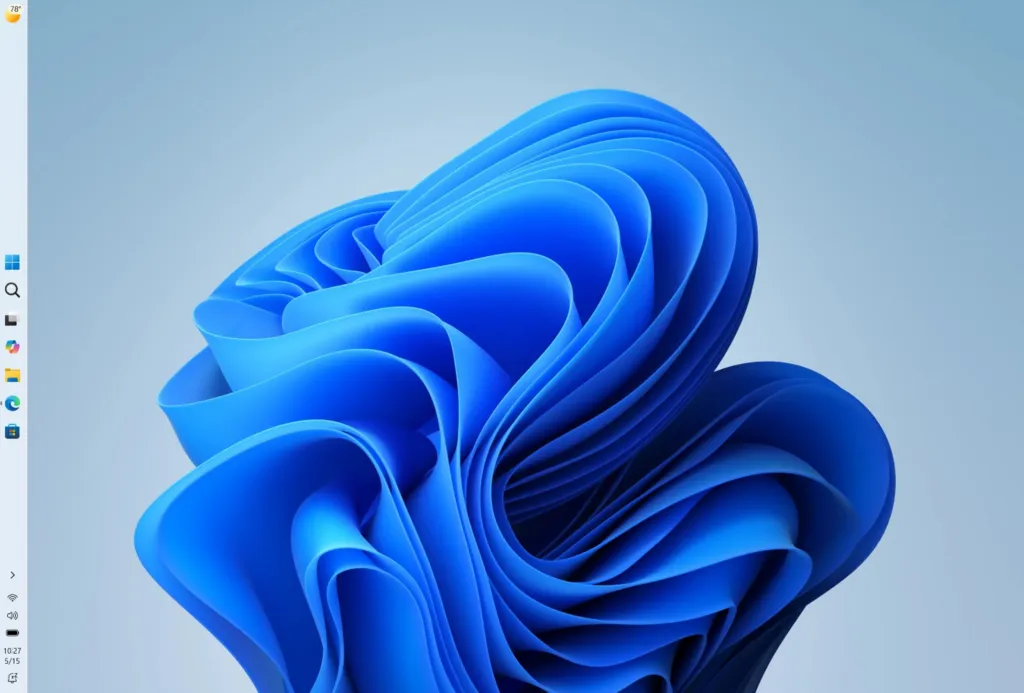
Microsoft is rolling out taskbar positioning to any screen edge along with related personalization options to Windows Insiders in the Experimental channel. The changes address long-standing user requests for flexibility in one of the operating system's core interfaces while noting several features still under development.
Source:Windows Blog
Post
Windows 11 Taskbar Gains Full Edge Positioning for Insiders
TL;DRAI · 60 sec read

Microsoft introduces taskbar positioning on any edge of the screen for Windows 11 Insiders. Users can place it top, bottom, left or right, with adjusted icon alignments and flyouts. Vertical taskbars display separate labeled buttons for each window. New options sit in Settings under Personalization. This change offers greater customization for different workflows and screen setups.

Microsoft is introducing new personalization options for the Windows taskbar, one of the operating system's most visible and frequently used elements. In a post published May 15, 2026 by Diego Baca on the Windows Blog, the company detailed progress on delivering improvements in performance, reliability and craft while addressing user feedback.

The updates focus on both the taskbar and Start menu, aiming to provide more flexibility to personalize these experiences. Several changes are rolling out to Windows Insiders in the Experimental channel over the coming weeks, with multiple features becoming available starting today.

Users can now position the taskbar on any edge of the screen: top, bottom, left or right. For each position, icon alignment options include top-aligned or centered for left or right taskbar placements, and left-aligned or centered when positioned on the top or bottom. Start, Search and other flyouts will open relative to the taskbar's new location, such as opening from the top when the taskbar sits there.

A vertical taskbar with "Never combine" buttons and labels enabled will display each app window as a separate labeled button. This allows users to see every window at a glance. The company notes this can help developers reclaim vertical screen space to view more code, while accessibility or ergonomics may make a top position preferable for some users.
From The CircuitryThe Feed — live briefs across tech, all day.See what’s happening →
To access the new settings, users go to Settings > Personalization > Taskbar > Taskbar behaviors, where the taskbar position option appears alongside taskbar icon alignment. The post includes screenshots demonstrating left-aligned, top-aligned and vertical configurations with labels.

Microsoft is continuing work on visual polish, performance improvements and known issues with this release. Features not yet included include support for auto-hide and tablet-optimized taskbar in alternate positions. Touch gestures for alternate positions remain in progress, and search boxes are not supported in alternate positions, appearing as a search icon instead.

The company is evaluating additional capabilities such as different taskbar positions per monitor and drag and drop functionality. Its stated focus is delivering core functionality while keeping the experience simple, predictable and free from accidental taskbar movement. The post also references plans for a smaller taskbar, noting that Windows 11 introduced a roomier default to support more states, features and improved touch targets that can impact smaller screens.
Expert Take: Windows administrators should test these Experimental channel taskbar options with developer and power users to assess productivity gains from vertical layouts and relative flyout positioning before considering broader deployment.

EXPERT TAKE

Windows administrators should test these Experimental channel taskbar options with developer and power users to assess productivity gains from vertical layouts and relative flyout positioning before considering broader deployment.

Why this mattersAI · ~100 words

Tap a lens to see what this story means for you.

Reader-supported
DonateBuy me a coffee →Follow@thecircuitry_ →Follow@thecircuitry.to →

Reader-supported · The Brief

Liked this? The Brief brings you the whole day in tech, verified, every morning. Two minutes, free forever.

HELP US IMPROVE
From The Circuitry

See what’s happening right now

The Feed runs all day — short, verified briefs the moment they break.

Open the Feed →
From The Circuitry

Follow @thecircuitry_

Every story we publish, as it happens. No noise between.

Follow on X ↗On Bluesky ↗

Reader-supported

The Circuitry is a passion project I've always wanted to build, and I love the work behind it.

Running it costs real money. APIs, hosting, time. To keep improving the site and growing this into something useful for everyone, those costs have to be covered.

Any contribution is appreciated. If not, no pressure. Thanks for reading.

Buy me a coffee
Windows 11TaskbarWindows InsiderPersonalization
More fromWindows Blog
  • Microsoft launches next Surface Pro and Laptop with Snapdragon X2

    Tech · 1mo
  • Microsoft Edge shifts to two-week release cycle

    Tech · 1mo
  • Microsoft and NVIDIA Launch RTX Spark Windows PCs

    Tech · 2mo
More inTech
  • Tesla and SpaceX confirm Terafab chip fab in Texas

    Tech · 1d
  • OpenAI Urges Federal Judge to Throw Out Apple's Trade Secrets Complaint

    Tech · 2d
  • Meta introduces Muse Code, its terminal-based coding agent

    Tech · 2d
SupportThe Work

The Circuitry is reader-supported. If you find the daily brief useful, you can buy me a coffee to keep it going.

Buy a coffee →
SubscribeCircuitry Brief

Liked this? The Brief brings you the whole day in tech, verified, every morning. Free forever.

MORE IN TECH

Tesla and SpaceX confirm Terafab chip fab in Texas

Tesla and SpaceX have confirmed Grimes County, Texas as the site for their Terafab semiconductor megafactory, with the first phase costing roughly $16.8 billion. The project targets the largest chip manufacturing facility on the planet to supply over 1 terawatt of compute per year that exceeds current and future global production capacity.

OpenAI Urges Federal Judge to Throw Out Apple's Trade Secrets Complaint

OpenAI has filed a motion asking a federal judge to dismiss Apple's trade secrets lawsuit, describing the claims as meritless. The dispute, which follows a July suit and this week's injunction request from Apple, highlights tensions after their prior partnership on Siri and OpenAI's hardware push.

Meta introduces Muse Code, its terminal-based coding agent

Meta has released an early beta of Muse Code, a terminal-based coding agent driven by the updated Muse Spark 1.2 model and positioned against Anthropic's Claude Code and OpenAI's Codex. Substantially lower rates, including a contributor plan at $0.10 for every million tokens received, may encourage migration away from higher-priced options such as Anthropic's Sonnet 5.